

Resources
Forums, wikis, guides, cover art and other sites worth knowing, gathered from around the PS3 scene.
Essential resources
Getting started
New to the PS3 scene? Start here. This section covers the basics, what your options are, what you'll need, and where to go next. Take your time and read through before diving in, and always follow trusted guides.
Which PS3 model do I have? (Fat, Slim, Super Slim)
The PS3 was released in three major hardware revisions. Knowing which one you have is the single most important step before choosing a method.
- Fat (Original, 2006–2009): CECH A/B/C/E/G/H/J/K/L/M/P/Q models. Glossy black, curved front; early models include a card reader and 4 USB ports, while later revisions (CECH-L/M/P/Q) dropped the card reader and reduced USB ports. Fully supports Custom Firmware (CFW). If the console is currently on firmware above 3.55, additional exploit steps are required to install CFW.
- Slim (2009–2012): CECH 20xx/21xx/25xx/30xx models. Matte finish, slimmer body. 20xx and 21xx are always CFW compatible. 25xx requires MinVerChk/BGToolSet to confirm minimum firmware is 3.56 or lower (consoles manufactured before April 2011, or date code 9/0/1A, are guaranteed compatible). 30xx cannot install CFW and requires PS3HEN.
- Super Slim (2012–2017): CECH 40xx/42xx/43xx models. Top-loading disc tray, sliding door. No CFW support. Use PS3HEN only.
Check the model number on the sticker on the back/bottom of the console. The first four characters (e.g. CECH-2501) identify the revision. Not sure? Use the Jailbreak checker checker. Seeing an error? Look it up in Error codes. Already hacked? The Setup wizard tells you what to install. Stuck on a word like HEN, PKG or RAP? See the Glossary. Not sure which controller you have, or if it’s fake? Try the Controller identifier.
CFW vs HEN vs OFW: what's the difference?
- OFW (Official Firmware): Stock Sony firmware. No homebrew, no backups. Required for stock consoles.
- CFW (Custom Firmware): Permanently modified firmware flashed to the console. Enables full homebrew, backup loading, mods, and more. Only compatible with Fat consoles and some early Slims (min firmware ≤ 3.55).
- PS3HEN (Homebrew Enabler): A software-only exploit for consoles that cannot run CFW (late Slims and Super Slims). You have to re-enable it after every reboot, but it runs most homebrew and backups. No console flashing required.
Rule of thumb: If you can install CFW, do. If you can't, use HEN. Never run OFW if you want homebrew.
What you'll need before you start
- A PS3 console matching one of the supported revisions above.
- A USB flash drive formatted to FAT32 (not exFAT, not NTFS).
- The correct firmware: don't update blindly to the latest OFW; it may close exploits. Check your target exploit's guide first.
- A stable internet connection if following online guides.
- Patience: the scene is well documented, but every console is slightly different. Read guides in full before acting.
Warning: Flashing firmware and enabling exploits carry risk. Back up your saves and important data first. If unsure, ask on PSX-Place before proceeding.
Choosing a guide
Once you know your model and your method, follow one trusted guide from start to finish. Mixing steps from different guides is the most common cause of problems.
- CFW users: Start with the ConsoleMods PS3 Wiki and Coro's Guides.
- HEN users: Follow The Great PS3 HEN All in One Guide.
- Visual learners: MrMario2011's video guides are highly recommended.
After you're set up: next steps
- Back up your console's flash (CFW only) before making any further changes.
- Install a backup manager, see the Homebrew tools page, such as webMAN MOD or IRISMAN to manage game dumps.
- Grab ISO tools: see the ISO tools page for dumpers and converters.
- Explore homebrew: see the Homebrew section for games, emulators, and tools.
- Customize your XMB with themes from the Themes section.
- Play online again: see Online multiplayer.
Forums
Wikis and tutorials
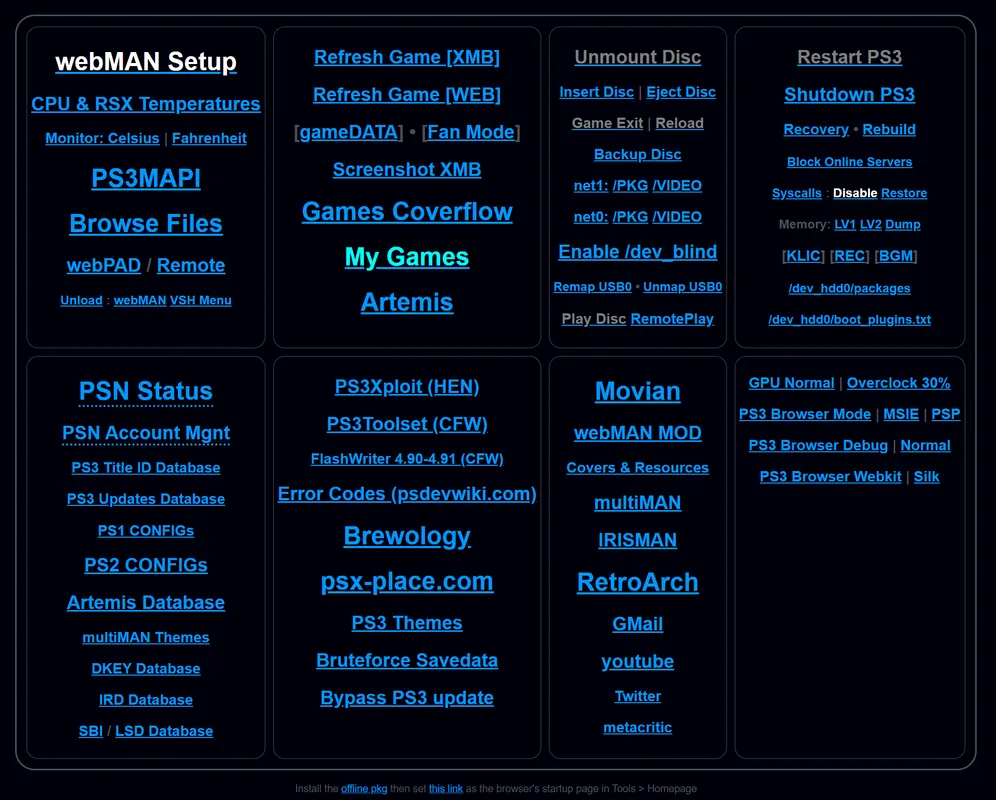
★ Aldo's Tools
A resource hub, maintained by aldostools. The site offers a wide range of tools, databases, and utilities for PS3 modding and preservation.
What you'll find:
- webMAN MOD tools and utilities
- PS3 Title ID Database and Updates Database
- multiMAN themes and cover resources
- IRD, SBI, and LSD databases
- PS3Xploit (HEN) and PS3Toolset (CFW)
- FlashWriter for CFW 4.90-4.91
- PS1 and PS2 CONFIGs
- Community links to psx-place, Brewology, and more
- CPU/RSX temperature monitoring
- And much more
SCZVIDEOGAMES's Tools
Repository of PS3 tools developed and compiled by SCZVIDEOGAMES. Features utilities for customizing, modifying, and getting the most out of your console. All tools are unified in one place for easy download.
Note: Page is in Spanish.
Online multiplayer
Fan-run servers bring shut-down PS3 online games back, with no modded console needed. The full list of servers, their DNS addresses and games, with a search and setup steps, now has its own page.
Game covers
Hosts for cover art scans, manual inserts, and retail box artwork.
Databases & repositories
Mockup 3D case template
By Durty101
"Created a template to a 3D ps3 case, its pretty simple to use in photoshop, pretty much drag and drop the cover art and name the spine and you are good to go, I also included a few i did that i couldn't find online using the template, hope it helps someone."
Sourced from Launchbox forums.

Repairs
Miscellaneous
Magazines
Links and credits
All links are community-sourced and kept for reference. Full credit belongs to the respective site owners and creators.